概述
Gas Town是多智能体编排系统,让一个 AI 代理("Mayor")管理一批专门角色的子代理并行工作,解决复杂软件开发任务。
Gas Town 不会在代理重启时丢失上下文,而是将工作状态持久化到基于 Git 的钩子中,从而实现可靠的多代理工作流。
这解决了什么问题?
Challenge | Gas Town 解决方案 |
|---|
Agents lose context on restart | Work persists in git-backed hooks |
Manual agent coordination | Built-in mailboxes, identities, and handoffs |
4-10 agents become chaotic | Scale comfortably to 20-30 agents |
Work state lost in agent memory | Work state stored in Beads ledger |
架构图
graph TB
Mayor[The Mayor<br/>AI Coordinator]
Town[Town Workspace<br/>~/gt/]
Town --> Mayor
Town --> Rig1[Rig: Project A]
Town --> Rig2[Rig: Project B]
Rig1 --> Crew1[Crew Member<br/>Your workspace]
Rig1 --> Hooks1[Hooks<br/>Persistent storage]
Rig1 --> Polecats1[Polecats<br/>Worker agents]
Rig2 --> Crew2[Crew Member]
Rig2 --> Hooks2[Hooks]
Rig2 --> Polecats2[Polecats]
Hooks1 -.git worktree.-> GitRepo1[Git Repository]
Hooks2 -.git worktree.-> GitRepo2[Git Repository]
style Mayor fill:#e1f5ff,color:#000000
style Town fill:#f0f0f0,color:#000000
style Rig1 fill:#fff4e1,color:#000000
style Rig2 fill:#fff4e1,color:#000000
核心概念
The Mayor (市长)
AI 协调员。市长是一个 Claude Code 实例,拥有关于您的工作区、项目和代理的完整上下文信息。 从这里开始 ——只需告诉市长您想要完成什么即可。
Town (城镇)
工作区目录(例如 ~/gt/ )。包含所有项目、代理和配置。
Rigs (钻进平台)
项目容器。每个设备都封装了一个 Git 仓库并管理其关联的代理。
Crew Members (船员)
在Rigs上的个人工作区。在这里进行实际操作。
Polecats (鼬鼠)
具有持久身份但会话短暂的工作代理。它们为执行任务而生成,会话在任务完成后结束,但身份和工作历史记录会保留。
Hooks (钩子)
基于 Git 工作树的代理工作持久化存储。即使崩溃和重启也能保留数据。
Convoys (车队)
Work tracking units. Bundle multiple beads that get assigned to agents. Convoys labeled mountain get autonomous stall detection and smart skip logic for epic-scale execution.
工作跟踪单元。将多个 Beads 捆绑在一起,分配给不同的agents。标记为 mountain 的 Convoys 具备自主停滞检测和智能跳跃逻辑,可实现史诗级规模的执行。
Beads Integration (珠子整合)
基于 Git 的问题跟踪系统,将工作状态存储为结构化数据。
Bead IDs (also called issue IDs)
采用前缀加 5 位字母数字的格式(例如, gt-abc12 、 hq-x7k2m )。前缀指示物品的来源或装备。诸如 gt sling 和 gt convoy 之类的命令接受这些 ID 来引用特定的工作项。
ps: Gastown词汇大全
安装
先决条件
Go 1.23+
Git 2.25+
Dolt 1.82.4+
Beads 0.55.4+
Sqlite3
Tmux 3.0+
Claude Code
设置
1.安装 Gas Town
推荐使用 brew 安装,方便,但需要使用brew的官方源,使用清华源或阿里源可能无法找到gastown包。
ps: 若是采用Go安装,请在 ~/.zshrc or ~/.bashrc 文件中增加:
export PATH="$PATH:$HOME/go/bin"
2.创建工作空间
gt install ~/gt --git
cd ~/gt
3.初始化工程
gt rig add myproject https://github.com/you/repo.git
4.创建crew空间
gt crew add yourname --rig myproject
cd myproject/crew/yourname
5.运行Mayor session
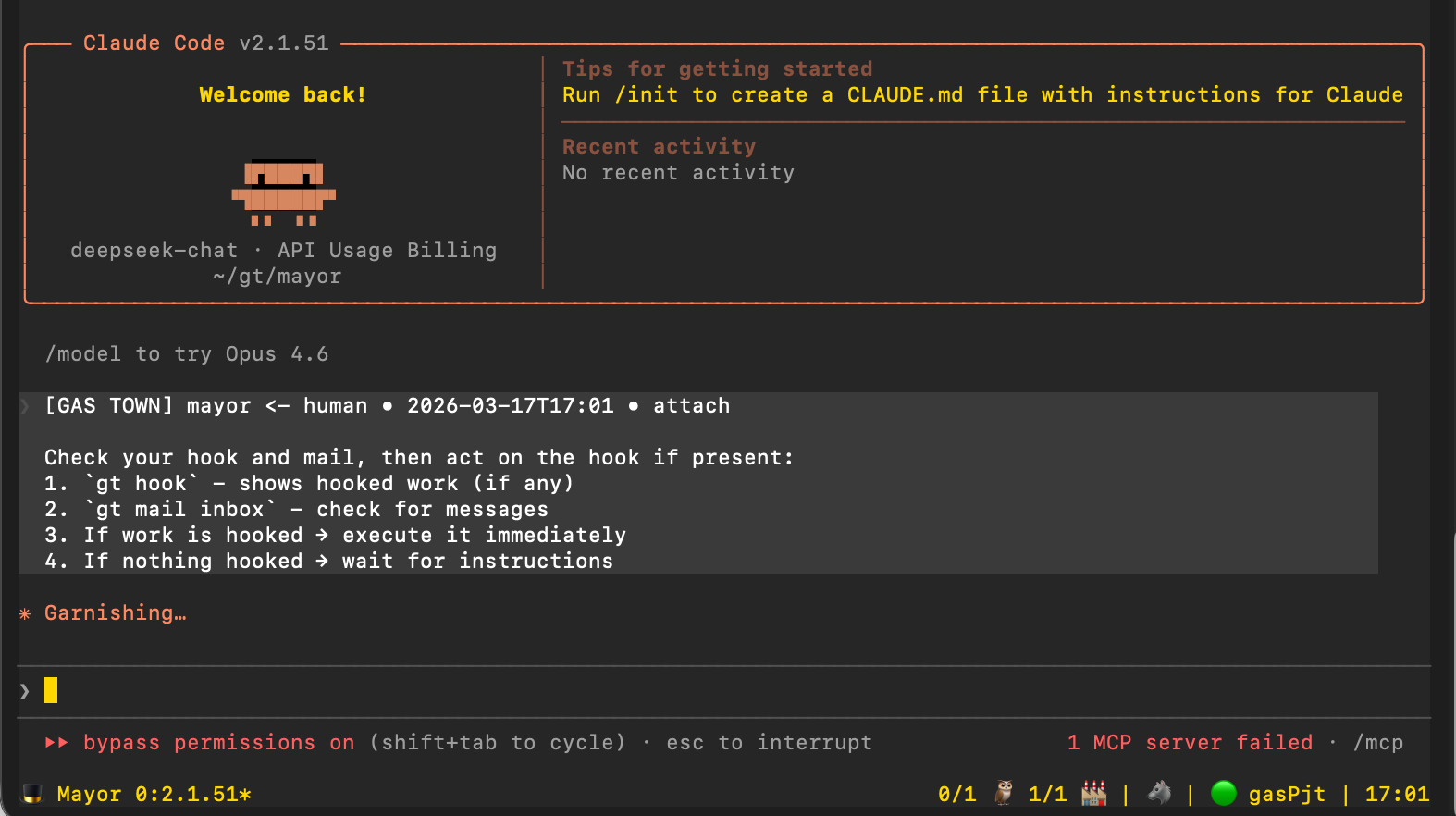
gt mayor attach
运行如下图,即安装成功;若未能正确运行,请执行gt doctor自检安装环境,并验证先决条件。
使用指南
工作流
sequenceDiagram
participant You
participant Mayor
participant Convoy
participant Agent
participant Hook
You->>Mayor: Tell Mayor what to build
Mayor->>Convoy: Create convoy with beads
Mayor->>Agent: Sling bead to agent
Agent->>Hook: Store work state
Agent->>Agent: Complete work
Agent->>Convoy: Report completion
Mayor->>You: Summary of progress
示例:功能开发
# 1. Start the Mayor
gt mayor attach

# 2. In Mayor session, create a convoy with bead IDs
gt convoy create "Feature X" gt-abc12 gt-def34 --notify --human
# 创建名为 "Feature X" 的任务车队
# gt-abc12、gt-def34 是子任务的 Bead ID
# --notify  完成时发送通知
# --human   需要人工介入/审核

# 3. Assign work to an agent
gt sling gt-abc12 myproject

# 4. Track progress
gt convoy list
# 列出所有任务车队及其当前状态

# 5. Monitor agents
gt agents
# 查看所有在运行的 AI 代理(Claude / Codex 等)状态
常用工作流
1.Mayor Workflow 市长工作流
适合协调复杂的多议题工作
flowchart LR
Start([Start Mayor]) --> Tell[Tell Mayor<br/>what to build]
Tell --> Creates[Mayor creates<br/>convoy + agents]
Creates --> Monitor[Monitor progress<br/>via convoy list]
Monitor --> Done{All done?}
Done -->|No| Monitor
Done -->|Yes| Review[Review work]
所需命令
# Attach to Mayor
gt mayor attach

# In Mayor, create convoy and let it orchestrate
gt convoy create "Auth System" gt-x7k2m gt-p9n4q --notify

# Track progress
gt convoy list
2.极简模式
手动运行各个运行时实例。Gas Town 只负责跟踪状态。
gt convoy create "Fix bugs" gt-abc12   # Create convoy (sling auto-creates if skipped)
gt sling gt-abc12 myproject            # Assign to worker
claude --resume                        # Agent reads mail, runs work (Claude)
# or: codex                            # Start Codex in the workspace
gt convoy list                         # Check progress
适合预定义、可重复的流程
公式是嵌入在 gt 二进制文件中的 TOML 定义的工作流程(源位于 internal/formula/formulas/ )。
示例文件 (internal/formula/formulas/release.formula.toml)
description = "Standard release process"
formula = "release"
version = 1

[vars.version]
description = "The semantic version to release (e.g., 1.2.0)"
required = true

[[steps]]
id = "bump-version"
title = "Bump version"
description = "Run ./scripts/bump-version.sh {{version}}"

[[steps]]
id = "run-tests"
title = "Run tests"
description = "Run make test"
needs = ["bump-version"]

[[steps]]
id = "build"
title = "Build"
description = "Run make build"
needs = ["run-tests"]

[[steps]]
id = "create-tag"
title = "Create release tag"
description = "Run git tag -a v{{version}} -m 'Release v{{version}}'"
needs = ["build"]

[[steps]]
id = "publish"
title = "Publish"
description = "Run ./scripts/publish.sh"
needs = ["create-tag"]
执行
# List available formulas
bd formula list

# Run a formula with variables
bd cook release --var version=1.2.0

# Create formula instance for tracking
bd mol pour release --var version=1.2.0
4.Manual Convoy Workflow(Manual Convoy 工作流)
适合直接控制工作分配
# Create convoy manually
gt convoy create "Bug Fixes" --human

# Add issues to existing convoy
gt convoy add hq-cv-abc gt-m3k9p gt-w5t2x

# Assign to specific agents
gt sling gt-m3k9p myproject/my-agent

# Check status
gt convoy show
运行时配置
Gas Town 支持多种 AI 编码运行时。每个设备的运行时设置位于 settings/config.json 中。
{
  "runtime": {
    "provider": "codex",
    "command": "codex",
    "args": [],
    "prompt_mode": "none"
  }
}
命令参考
工作区管理
gt install <path>           # Initialize workspace
gt rig add <name> <repo>    # Add project
gt rig list                 # List projects
gt crew add <name> --rig <rig>  # Create crew workspace
Agent 设置
gt agents                   # List active agents
gt sling <bead-id> <rig>    # Assign work to agent
gt sling <bead-id> <rig> --agent cursor   # Override runtime for this sling/spawn
gt mayor attach             # Start Mayor session
gt mayor start --agent auggie           # Run Mayor with a specific agent alias
gt prime                    # Context recovery (run inside existing session)
gt feed                     # Real-time activity feed (TUI)
gt feed --problems          # Start in problems view (stuck agent detection)
实践: 通过此设置将Agent指向deepseek, 使用如下命令:
// 首先增加Agent deepseek-XXX, 注意 deepseek-XXX 一定为可执行命令!
gt config agent set deepseek-XXX "deepseek-XXX --dangerously-skip-permissions"
// 以上运行成功后,运行此命令查看agent列表中是否有我们指定的deepseek-XXX
gt config agent list
// 将 deepseek-XXX 设置为默认 Agent
gt config default-agent deepseek-XXX
Convoy (Work Tracking)
gt convoy create <name> [issues...]   # Create convoy with issues
gt convoy list              # List all convoys
gt convoy show [id]         # Show convoy details
gt convoy add <convoy-id> <issue-id...>  # Add issues to convoy
Configuration
# Set custom agent command
gt config agent set claude-glm "claude-glm --model glm-4"
gt config agent set codex-low "codex --thinking low"

# Set default agent
gt config default-agent claude-glm
Beads Integration
bd formula list             # List formulas
bd cook <formula>           # Execute formula
bd mol pour <formula>       # Create trackable instance
bd mol list                 # List active instances
Activity Feed
gt feed 启动了一个交互式终端仪表板,用于实时监控所有代理活动。它将 Beads 活动、代理事件和合并队列更新整合到一个三面板的 TUI 中。
仪表板
Gas Town 包含一个用于监控工作区的 Web 控制面板。该控制面板必须在 Gas Town 工作区(总部)目录内运行。
# Start dashboard (default port 8080)
gt dashboard

# Start on a custom port
gt dashboard --port 3000

# Start and automatically open in browser
gt dashboard --open
仪表盘以单页概览的形式呈现工作区中的所有动态:代理、队列、钩子、队列、问题和升级。它通过 htmx 自动刷新,并包含一个命令面板,可直接从浏览器运行 gt 命令。
以上我们完成了Gastown的初步创立和使用。
ps: 测试平台为Macmini4,其余平台请在官方文档中额外参考补充。
参考
Gastown Github
附件:全命令列表
命令 | 英文说明 | 中文说明 |
|---|
工作管理 |
assign | Create a bead and hook it to a crew member | 创建工作单元并分配给团队成员 |
bead | Bead management utilities | 工作单元管理工具 |
cat | Display bead content | 显示工作单元内容 |
cleanup | Clean up orphaned Claude processes | 清理孤立的 Claude 进程 |
close | Close one or more beads | 关闭一个或多个工作单元 |
commit | Git commit with automatic agent identity | 带自动代理身份的 Git 提交 |
compact | Compact expired wisps (TTL-based cleanup) | 压缩已过期的临时数据(基于TTL清理) |
convoy | Track batches of work across rigs | 跨机器追踪批量工作进度 |
done | Signal work ready for merge queue | 标记工作已准备好进入合并队列 |
forget | Remove a stored memory | 删除已存储的记忆 |
formula | Manage workflow formulas | 管理工作流程公式 |
handoff | Hand off to a fresh session, work continues from hook | 移交给新会话,工作从钩子继续 |
hook | Show or attach work on a hook | 显示或绑定钩子上的工作 |
memories | List or search stored memories | 列出或搜索已存储的记忆 |
mol | Agent molecule workflow commands | 代理分子工作流命令 |
mountain | Activate Mountain-Eater: stage, label, and launch an epic | 激活"山食者":暂存、标记并启动大型任务 |
mq | Merge queue operations | 合并队列操作 |
orphans | Find lost polecat work | 查找丢失的 polecat 工作 |
prune-branches | Remove stale local polecat tracking branches | 删除过时的本地 polecat 跟踪分支 |
ready | Show work ready across town | 显示全局已就绪的工作 |
release | Release stuck in_progress issues back to pending | 将卡住的进行中问题释放回待处理状态 |
remember | Store a persistent memory | 存储持久化记忆 |
resume | Check for handoff messages | 检查移交消息 |
scheduler | Manage dispatch scheduler | 管理调度计划器 |
show | Show details of a bead | 显示工作单元详情 |
sling | Assign work to an agent (THE unified work dispatch command) | 将工作分配给代理(统一工作调度命令) |
synthesis | Manage convoy synthesis steps | 管理车队合成步骤 |
trail | Show recent agent activity | 显示近期代理活动记录 |
unsling | Remove work from an agent's hook | 从代理钩子上移除工作 |
wl | Wasteland federation commands | 荒地联邦命令 |
代理管理 |
agents | List Gas Town agent sessions | 列出 Gas Town 代理会话 |
boot | Manage Boot (Deacon watchdog) | 管理 Boot(Deacon 看门狗) |
callbacks | Handle agent callbacks | 处理代理回调 |
deacon | Manage the Deacon (town-level watchdog) | 管理 Deacon(镇级看门狗) |
dog | Manage dogs (cross-rig infrastructure workers) | 管理 dog(跨机器基础设施工作者) |
mayor | Manage the Mayor (Chief of Staff for cross-rig coordination) | 管理 Mayor(跨机器协调总参谋长) |
polecat | Manage polecats (persistent identity, ephemeral sessions) | 管理 polecat(持久身份、临时会话) |
refinery | Manage the Refinery (merge queue processor) | 管理 Refinery(合并队列处理器) |
role | Show or manage agent role | 显示或管理代理角色 |
session | Manage polecat sessions | 管理 polecat 会话 |
signal | Claude Code hook signal handlers | Claude Code 钩子信号处理器 |
witness | Manage the Witness (per-rig polecat health monitor) | 管理 Witness(每机器 polecat 健康监视器) |
通信 |
broadcast | Send a nudge message to all workers | 向所有工作者发送广播消息 |
dnd | Toggle Do Not Disturb mode for notifications | 切换免打扰模式 |
escalate | Escalation system for critical issues | 关键问题升级系统 |
mail | Agent messaging system | 代理消息系统 |
notify | Set notification level | 设置通知级别 |
nudge | Send a synchronous message to any Gas Town worker | 向任意工作者发送同步消息 |
peek | View recent output from a polecat or crew session | 查看 polecat 或团队会话的近期输出 |
服务 |
daemon | Manage the Gas Town daemon | 管理 Gas Town 守护进程 |
dolt | Manage the Dolt SQL server | 管理 Dolt SQL 服务器 |
down | Stop all Gas Town services | 停止所有 Gas Town 服务 |
maintain | Run full Dolt maintenance (reap + flatten + gc) | 运行完整 Dolt 维护(清理+压平+垃圾回收) |
quota | Manage account quota rotation | 管理账户配额轮换 |
reaper | Wisp and issue cleanup operations (Dog-callable helpers) | 临时数据和问题清理操作(Dog 可调用辅助工具) |
shutdown | Shutdown Gas Town with cleanup | 关闭 Gas Town 并执行清理 |
start | Start Gas Town or a crew workspace | 启动 Gas Town 或团队工作区 |
up | Bring up all Gas Town services | 启动所有 Gas Town 服务 |
工作区 | | |
crew | Manage crew workers (persistent workspaces for humans) | 管理团队工作者(人类使用的持久工作区) |
git-init | Initialize git repository for a Gas Town HQ | 为 Gas Town HQ 初始化 Git 仓库 |
init | Initialize current directory as a Gas Town rig | 将当前目录初始化为 Gas Town 节点 |
install | Create a new Gas Town HQ (workspace) | 创建新的 Gas Town HQ(工作区) |
namepool | Manage polecat name pools | 管理 polecat 名称池 |
rig | Manage rigs in the workspace | 管理工作区中的机器节点 |
worktree | Create worktree in another rig for cross-rig work | 在另一节点创建工作树以进行跨节点工作 |
配置 |
account | Manage Claude Code accounts | 管理 Claude Code 账户 |
completion | Generate the autocompletion script for the specified shell | 生成指定 Shell 的自动补全脚本 |
config | Manage Gas Town configuration | 管理 Gas Town 配置 |
disable | Disable Gas Town system-wide | 全系统禁用 Gas Town |
enable | Enable Gas Town system-wide | 全系统启用 Gas Town |
hooks | Centralized hook management for Gas Town | Gas Town 集中钩子管理 |
issue | Manage current issue for status line display | 管理状态栏显示的当前问题 |
plugin | Plugin management | 插件管理 |
shell | Manage shell integration | 管理 Shell 集成 |
theme | View or set tmux theme for the current rig | 查看或设置当前节点的 tmux 主题 |
uninstall | Remove Gas Town from the system | 从系统中移除 Gas Town |
诊断 |
activity | Emit and view activity events | 发出并查看活动事件 |
audit | Query work history by actor | 按操作者查询工作历史 |
checkpoint | Manage session checkpoints for crash recovery | 管理会话检查点以用于崩溃恢复 |
costs | Show costs for running Claude sessions | 显示运行 Claude 会话的费用 |
dashboard | Start the convoy tracking web dashboard | 启动车队跟踪 Web 仪表盘 |
doctor | Run health checks on the workspace | 对工作区运行健康检查 |
feed | Show real-time activity feed of gt events | 显示 gt 事件的实时活动流 |
heartbeat | Update agent heartbeat state | 更新代理心跳状态 |
help | Help about any command | 显示命令帮助信息 |
info | Show Gas Town information and what's new | 显示 Gas Town 信息及新内容 |
log | View town activity log | 查看镇活动日志 |
metrics | Show command usage statistics | 显示命令使用统计 |
patrol | Patrol digest management | 巡逻摘要管理 |
prime | Output role context for current directory | 输出当前目录的角色上下文 |
seance | Talk to your predecessor sessions | 与前任会话对话 |
stale | Check if the gt binary is stale | 检查 gt 二进制文件是否过时 |
status | Show overall town status | 显示整体镇状态 |
thanks | Thank the human contributors to Gas Town | 感谢 Gas Town 的人类贡献者 |
upgrade | Run post-install migration and sync workspace state | 运行安装后迁移并同步工作区状态 |
version | Print version information | 打印版本信息 |
vitals | Show unified health dashboard | 显示统一健康仪表盘 |
whoami | Show current identity for mail commands | 显示邮件命令的当前身份 |
附加命令 |
cycle | Cycle between sessions in the same group | 在同组会话之间切换 |
health | Show comprehensive system health | 显示全面的系统健康状态 |
krc | Key Record Chronicle - manage ephemeral data TTLs | 关键记录年鉴——管理临时数据TTL |
tap | Claude Code hook handlers | Claude Code 钩子处理器 |
town | Town-level operations | 镇级操作 |
warrant | Manage death warrants for stuck agents | 管理针对卡死代理的终止令 |


评论