

Introducing the Model Context Protocol(MCP)
参考ANTHROPIC的文献:
[1] ANTHROPIC. Introducing the Model Context Protocol[S/OL]. 2024-11. [2024-12-15]. https://modelcontextprotocol.io/specification/latest.
[2] ANTHROPIC. Build an MCP server[S/OL]. 2024-11. [2024-12-15].
https://modelcontextprotocol.io/docs/develop/build-server.
MCP简介
Model Context Protocol (MCP) 是 Anthropic 开发的一个开放协议标准,用于在大语言模型(LLM)应用和外部数据源及工具之间建立安全、标准化的连接。
使用 MCP,大语言模型(LLM)应用可以连接到数据源(例如本地文件、数据库)、工具(例如搜索引擎、计算器)和工作流程(例如专门的提示),从而使它们能够访问关键信息并执行任务。
可以将 MCP 视为人工智能应用的 USB-C 接口。正如 USB-C 提供了一种连接电子设备的标准化方式一样,MCP 也提供了一种将人工智能应用连接到外部系统的标准化方式。
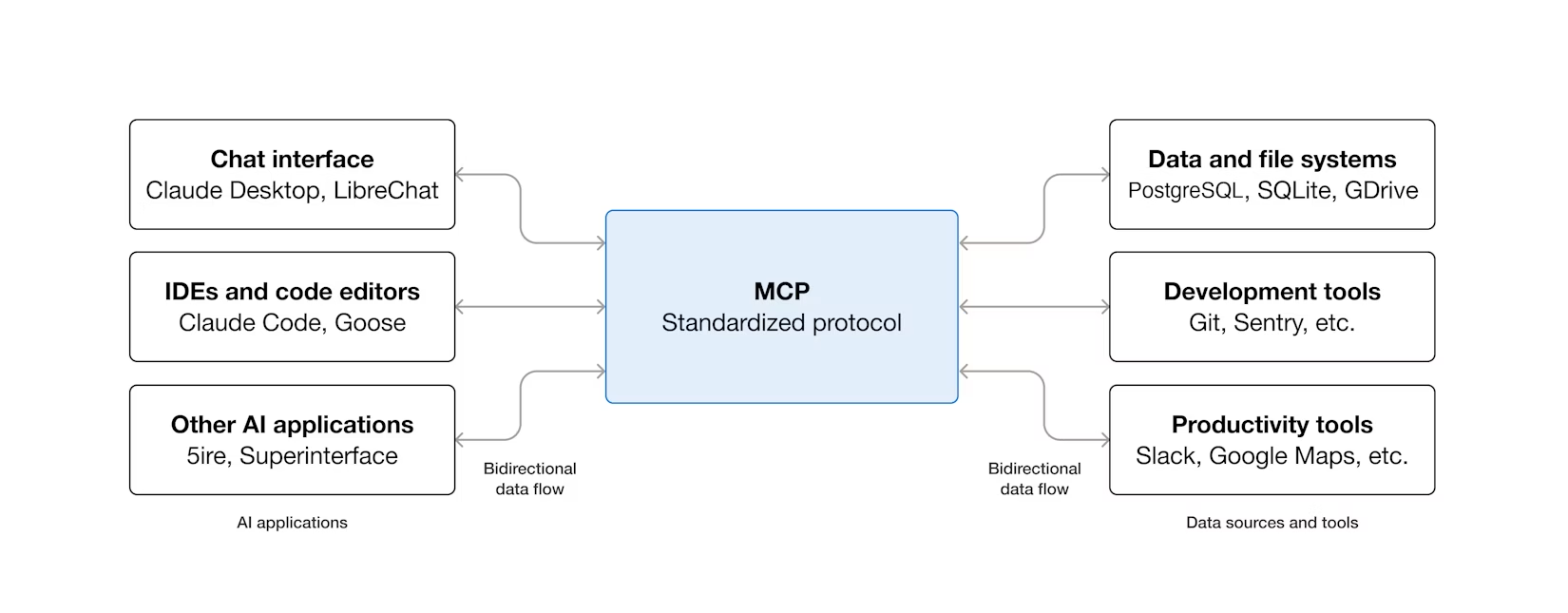
MCP架构组成
MCP 采用客户端-服务器架构,在 LLM 应用和工具/数据源之间建立标准化接口:
1. MCP Host(主机)
- LLM 应用(如 Claude Desktop、IDEs)
- 负责管理与 MCP 服务器的连接
2. MCP Client(客户端)
- 维护与服务器的 1:1 连接
- 处理协议消息
3. MCP Server(服务器)
- 提供特定功能的轻量级程序
- 暴露资源(Resources)、工具(Tools)和提示词(Prompts)
MCP传输层
传输层负责实际的通信传输,MCP支持多种传输机制:
标准输入/输出(Stdio)传输:
进程间通信:通过标准输入(stdin)/输出(stdout)与 MCP 客户端通信
JSON-RPC over stdio:使用 JSON-RPC 协议
本地运行:服务器作为子进程启动
适用于:Node.js、Python、Rust 等本地脚本
在 MCP 中,例如:
// MCP STDIO 服务器配置
{
  "mcpServers": {
    "my-server": {
      "command": "node",          // 可执行命令
      "args": ["server.js"],      // 参数
      "transport": "stdio"        // 传输类型:stdio
    }
  }
}
SSE (Server-Sent Events) 服务器
HTTP 长连接:基于 HTTP/1.1 的 Server-Sent Events
单向流式:服务器 → 客户端的单向通信
自动重连:内置连接管理
适用于:远程服务、云服务、需要 HTTP 访问的场景
例如Figma、MasterGo等传输类型均是sse,如下所示:
{
  "mcpServers": {
    "my-sse-server": {
      "url": "http://localhost:8080/sse",
      "transport": "sse"          // 传输类型:sse
    }
  }
}
Stramable HTTP
HTTP/1.1 分块传输 或 HTTP/2 流
双向流式支持(如果服务器支持)
支持请求/响应流
适用于:REST API、WebSocket 备选、需要流式处理的 HTTP 服务
这通常指的是 HTTP 传输,支持流式响应:
{
  "mcpServers": {
    "my-http-server": {
      "url": "http://localhost:3000/mcp",
      "transport": "http"         // 或支持流式的变体
    }
  }
}
MCP 传输类型对比
构建MCP Server
MCP 服务器可以提供三种主要类型的功能:
Resources: 可供客户端读取的类文件数据(例如 API 响应或文件内容)
Tools: LLM 可以调用的函数(需经用户批准)
Prompts: 预先编写的模板,可帮助用户完成特定任务
Sampling: 允许服务器请求 LLM 补全
MCP Demo (STDIO类型)
使用AI用Node.js实现一个简单Demo,server.js:
#!/usr/bin/env node

/**
 * 简单的 MCP 服务器示例 (Node.js 版本)
 * 提供基础的工具和资源功能
 */

const readline = require('readline');

class SimpleMCPServer {
  constructor() {
    this.resources = {
      greeting: '你好,欢迎使用 MCP 服务器!',
      info: '这是一个简单的 MCP 服务器演示'
    };
  }

  handleInitialize(params) {
    return {
      protocolVersion: '2024-11-05',
      capabilities: {
        resources: {},
        tools: {}
      },
      serverInfo: {
        name: 'simple-mcp-server',
        version: '1.0.0'
      }
    };
  }

  handleResourcesList(params) {
    return {
      resources: [
        {
          uri: 'resource://greeting',
          name: '问候语',
          description: '返回欢迎消息',
          mimeType: 'text/plain'
        },
        {
          uri: 'resource://info',
          name: '服务器信息',
          description: '返回服务器基本信息',
          mimeType: 'text/plain'
        }
      ]
    };
  }

  handleResourcesRead(params) {
    const uri = params.uri || '';
    const resourceKey = uri.replace('resource://', '');

    if (resourceKey in this.resources) {
      return {
        contents: [
          {
            uri: uri,
            mimeType: 'text/plain',
            text: this.resources[resourceKey]
          }
        ]
      };
    }
    return { error: 'Resource not found' };
  }

  handleToolsList(params) {
    return {
      tools: [
        {
          name: 'get_current_time',
          description: '获取当前时间',
          inputSchema: {
            type: 'object',
            properties: {
              format: {
                type: 'string',
                description: '时间格式(可选)',
                enum: ['12h', '24h']
              }
            }
          }
        },
        {
          name: 'calculate',
          description: '执行简单的数学计算',
          inputSchema: {
            type: 'object',
            properties: {
              expression: {
                type: 'string',
                description: '数学表达式,如 "2 + 2"'
              }
            },
            required: ['expression']
          }
        },
        {
          name: 'reverse_string',
          description: '反转字符串',
          inputSchema: {
            type: 'object',
            properties: {
              text: {
                type: 'string',
                description: '要反转的字符串'
              }
            },
            required: ['text']
          }
        }
      ]
    };
  }

  handleToolsCall(params) {
    const toolName = params.name;
    const args = params.arguments || {};

    if (toolName === 'get_current_time') {
      const timeFormat = args.format || '24h';
      const now = new Date();
      let timeStr;

      if (timeFormat === '12h') {
        timeStr = now.toLocaleTimeString('zh-CN', {
          hour12: true,
          hour: '2-digit',
          minute: '2-digit',
          second: '2-digit'
        });
      } else {
        timeStr = now.toLocaleTimeString('zh-CN', {
          hour12: false,
          hour: '2-digit',
          minute: '2-digit',
          second: '2-digit'
        });
      }

      return {
        content: [
          {
            type: 'text',
            text: `当前时间: ${timeStr}`
          }
        ]
      };
    }

    if (toolName === 'calculate') {
      const expression = args.expression || '';
      try {
        // 安全的数学计算 - 只允许基本运算符
        const sanitized = expression.replace(/[^0-9+\-*/().\s]/g, '');
        if (sanitized !== expression) {
          throw new Error('表达式包含非法字符');
        }
        const result = Function('"use strict"; return (' + sanitized + ')')();
        return {
          content: [
            {
              type: 'text',
              text: `${expression} = ${result}`
            }
          ]
        };
      } catch (error) {
        return {
          content: [
            {
              type: 'text',
              text: `计算错误: ${error.message}`
            }
          ],
          isError: true
        };
      }
    }

    if (toolName === 'reverse_string') {
      const text = args.text || '';
      const reversed = text.split('').reverse().join('');
      return {
        content: [
          {
            type: 'text',
            text: `原文: "${text}"\n反转后: "${reversed}"`
          }
        ]
      };
    }

    return { error: 'Unknown tool' };
  }

  handleRequest(request) {
    const method = request.method;
    const params = request.params || {};

    const handlers = {
      'initialize': () => this.handleInitialize(params),
      'resources/list': () => this.handleResourcesList(params),
      'resources/read': () => this.handleResourcesRead(params),
      'tools/list': () => this.handleToolsList(params),
      'tools/call': () => this.handleToolsCall(params)
    };

    const handler = handlers[method];
    if (handler) {
      const result = handler();
      return {
        jsonrpc: '2.0',
        id: request.id,
        result: result
      };
    }

    return {
      jsonrpc: '2.0',
      id: request.id,
      error: {
        code: -32601,
        message: `Method not found: ${method}`
      }
    };
  }

  run() {
    console.error('MCP 服务器已启动,等待请求...');

    const rl = readline.createInterface({
      input: process.stdin,
      output: process.stdout,
      terminal: false
    });

    rl.on('line', (line) => {
      try {
        const request = JSON.parse(line);
        const response = this.handleRequest(request);
        console.log(JSON.stringify(response));
      } catch (error) {
        const errorResponse = {
          jsonrpc: '2.0',
          id: null,
          error: {
            code: -32700,
            message: 'Parse error'
          }
        };
        console.log(JSON.stringify(errorResponse));
      }
    });

    rl.on('close', () => {
      console.error('MCP 服务器已关闭');
      process.exit(0);
    });
  }
}

// 启动服务器
if (require.main === module) {
  const server = new SimpleMCPServer();
  server.run();
}

module.exports = SimpleMCPServer;
实现的 MCP 协议方法
initialize - 服务器初始化(server.js:18-30)
resources/list - 列出可用资源(server.js:32-49)
resources/read - 读取资源内容(server.js:51-67)
tools/list - 列出可用工具(server.js:69-116)
tools/call - 调用工具执行(server.js:118-197)
提供的功能
1. 资源(Resources)
- resource://greeting - 静态问候语
- resource://info - 服务器信息
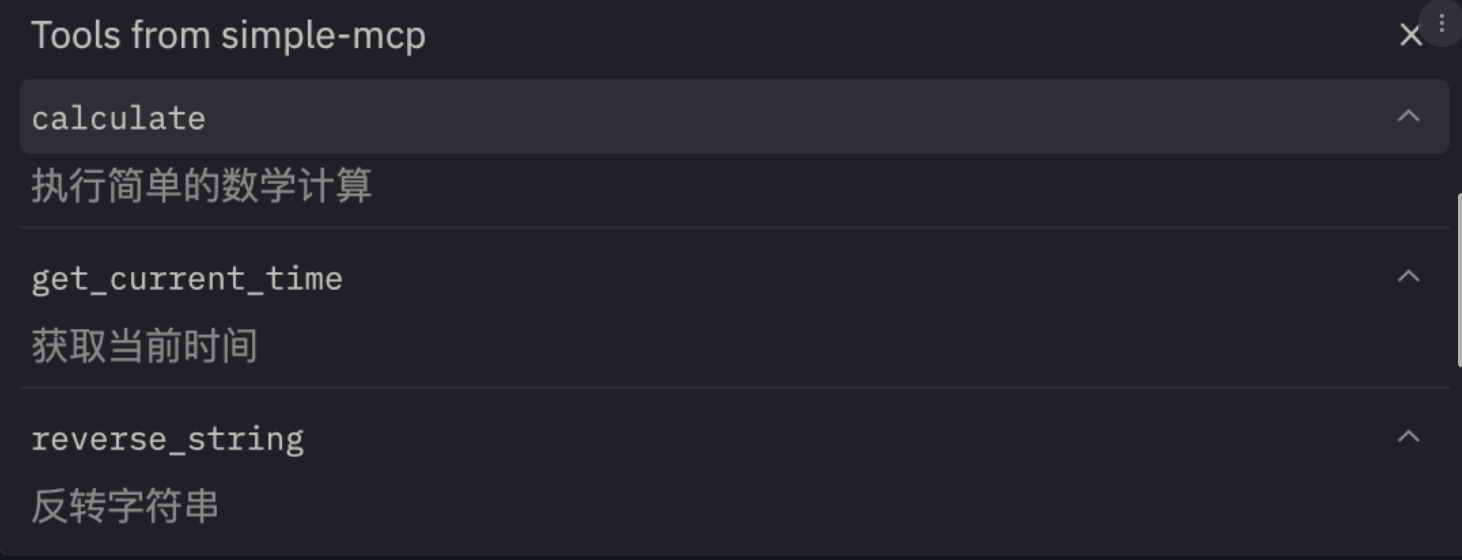
2. 工具(Tools)
- get_current_time - 获取当前时间,支持12/24小时制
- calculate - 安全的数学计算器
- reverse_string - 字符串反转工具#### 提供的功能
1. 资源(Resources)
- resource://greeting - 静态问候语
- resource://info - 服务器信息
2. 工具(Tools)
- get_current_time - 获取当前时间,支持12/24小时制
- calculate - 安全的数学计算器
- reverse_string - 字符串反转工具
MCP集成
{
  "mcpServers": {
    "simple-mcp": {
      "command": "node",
      "args": ["/path/to/your/server.js"]
    }
  }
}
补充说明:
Introducing the Model Context Protocol(MCP)
https://dhc.ink/archives/introducing-the-model-context-protocol-mcp
评论